Quick answer
Start by checking your lease for lock-change restrictions. If your lease prohibits changes, get a retrofit lock that replaces only the interior thumbturn. If changes are allowed, you have more options. Then match the lock to your smart home ecosystem and budget.
Choosing a smart lock for an apartment is not the same as choosing one for a house you own. Homeowners can swap deadbolts freely, drill new holes, and never worry about restoring original hardware. Renters have lease restrictions, security deposits on the line, and a move-out day that requires putting everything back the way it was.
Most smart lock guides ignore these constraints entirely. They recommend full deadbolt replacements without mentioning that your landlord might not allow it, or that you need to keep the original hardware in a safe place for months or years until you move.
This guide walks you through the decision step by step — from checking your lease to choosing the right installation type, connectivity, ecosystem, and budget. By the end, you will know exactly which type of smart lock fits your apartment situation.
Step 1: Check your lease
Before you spend a dollar on a smart lock, read your lease agreement. This single step determines which locks you can even consider.
What to look for
Search your lease for language about locks, keys, door hardware, or modifications. Common clauses include:
- "Tenant shall not change or add locks" — This is the strictest version. You need a retrofit lock that does not replace any part of the deadbolt mechanism itself.
- "Tenant may not alter locks without written permission" — You have a path forward. Get permission in writing (email is fine) before making changes.
- "Tenant must provide landlord with a key to any new lock" — Most smart locks that replace the full deadbolt include physical keys, so this is usually workable.
- No mention of locks at all — Proceed with caution. The absence of a clause does not automatically mean approval, but it gives you more room to make the case.
How to ask your landlord
If your lease requires permission or is unclear, contact your landlord in writing. Keep it simple and practical: explain that you want to install a smart lock for added security, that you will keep the original hardware, and that you will restore everything when you move out. Mention the specific lock model and that it does not permanently modify the door. Most landlords will agree, especially for retrofit models that leave the exterior unchanged.
Always get approval in writing — a text message or email thread is sufficient. Verbal agreements are difficult to prove if there is a dispute later.
What happens if you change locks without permission
In most jurisdictions, changing locks without landlord permission is a lease violation. The consequences range from a warning to deductions from your security deposit to potential eviction in extreme cases. Even if you plan to restore the original hardware on move-out day, an unauthorized lock change during your tenancy can cause problems — especially if the landlord needs emergency access. It is not worth the risk. Either get permission or choose a retrofit lock that does not technically change the lock mechanism.
Security deposit implications
If you replace a deadbolt and fail to restore the original on move-out day, expect a deduction from your security deposit. Landlords can charge for a locksmith to rekey or replace the lock, which typically runs $75 to $200. Even if you restore the hardware yourself, any damage to the door (screw holes that do not align, scratched finishes) can result in charges. Retrofit locks avoid this risk almost entirely because they do not alter the door or exterior hardware.
Step 2: Understand installation types
Smart locks come in three installation categories. The right one for you depends on your lease situation and how much you are willing to modify your door.
| Product | Score | Price | Subscription |
|---|---|---|---|
| Retrofit (Interior Only) Best for Renters | 9 | $150–$200 | No |
| Full Deadbolt Replacement Most Features | 8.5 | $200–$330 | No |
| Invisible (Hidden in Deadbolt) Most Discreet | 7.8 | $250–$330 | No |
Retrofit (interior only)
Retrofit locks replace only the interior thumbturn of your existing deadbolt. The exterior side — the part your landlord and neighbors see — stays completely unchanged. Your original keys still work. Examples include the Aqara U100 ($180–200) and August Wi-Fi Smart Lock ($150–180).
This is the safest choice for renters. You do not need landlord permission in most cases, installation takes 10 to 15 minutes with a screwdriver, and restoration on move-out day is equally fast.
Full deadbolt replacement
These locks replace the entire deadbolt assembly — both the interior and exterior hardware. They offer the most features (keypads, touchscreens, fingerprint readers on the exterior) but require landlord permission and careful storage of the original hardware. Examples include the Yale Assure Lock 2 ($200–280) and Schlage Encode Plus ($280–330).
Invisible (hidden in deadbolt)
The Level Lock+ ($250–330) hides all electronics inside the deadbolt bolt itself. It replaces the deadbolt mechanism but looks like a completely normal lock from both sides. This is the premium option for renters in buildings with strict appearance rules.
Pros
- + Retrofit locks need no landlord permission in most cases
- + Retrofit installation takes 10–15 minutes
- + Original hardware stays intact with retrofit models
- + Full replacements offer more features like keypads
- + Invisible locks satisfy strict building appearance rules
Cons
- - Retrofit locks have limited deadbolt compatibility
- - Full replacements require landlord permission
- - Full replacements require saving and restoring original hardware
- - Invisible locks are expensive for fewer features
- - Not all deadbolts work with all smart lock types
Step 3: Choose your connectivity
Smart locks connect to your phone and smart home system through different wireless protocols. Each has trade-offs, and understanding them will prevent buyer's remorse.
Bluetooth
Every smart lock includes Bluetooth. It provides basic phone-to-lock communication within about 30 feet. The catch: no remote access. You can only control the lock when you are physically nearby. Bluetooth is fine as a baseline, but you almost certainly want something more.
Wi-Fi
Built-in Wi-Fi gives you remote access — check your lock status from work, unlock for a delivery person while you are away, get real-time notifications. The downside is higher battery drain. Wi-Fi locks typically need battery changes every 6 to 8 months instead of 12. Models with built-in Wi-Fi include the August Wi-Fi Smart Lock and Schlage Encode Plus.
Thread
Thread is a low-power mesh networking protocol designed for smart home devices. It is more battery-efficient than Wi-Fi and creates a mesh network through compatible devices (HomePod Mini, Apple TV 4K, some Echo devices). You get remote access through a Thread border router without the battery penalty of Wi-Fi. The Aqara U100 and Level Lock+ support Thread.
Matter
Matter is the universal smart home standard that works across Apple, Google, Amazon, and Samsung platforms. A Matter-compatible lock will work with any Matter controller, regardless of brand. Matter typically runs over Thread for locks. If you want maximum future-proofing, prioritize Matter support. The Aqara U100, Level Lock+, and Yale Assure Lock 2 (with Matter module) all support it.
What you actually need
For most apartment dwellers, the practical choice comes down to two options. If you want simplicity and do not mind shorter battery life, get a lock with built-in Wi-Fi — it works immediately with no additional hardware. If you already own a Thread border router (HomePod Mini, Apple TV 4K), a Thread-enabled lock gives you remote access with better battery life. Do not overthink this — both approaches work well for apartment use.
Step 4: Match your ecosystem
Your smart home platform determines which locks will integrate smoothly into your daily routine. Buying a lock that does not work with your existing setup is one of the most common and most frustrating mistakes.
Apple HomeKit and Home Key users
If you use Apple Home, you want a lock with native HomeKit support. Apple Home Key takes it further — tap your iPhone or Apple Watch to the lock to unlock instantly, no app required. It works even when your phone battery is critically low.
Amazon Alexa users
Alexa users can voice-control compatible locks and build routines (like locking all doors at bedtime). Most major smart locks support Alexa, with the notable exception of the Level Lock+.
Google Home users
Google Home integration works similarly to Alexa — voice commands, routines, and status checks through Google speakers and displays. Ecosystem support mirrors the Alexa landscape closely.
Samsung SmartThings users
SmartThings support is more limited in the smart lock category. If SmartThings is your primary platform, the Yale Assure Lock 2 is your best option with native integration.
Multi-platform households
If your household mixes ecosystems — an iPhone user and an Android user, Alexa in the kitchen and Google in the bedroom — you need a lock that works everywhere. The Yale Assure Lock 2 has the widest platform support of any smart lock available. Alternatively, any Matter-compatible lock will work across platforms through the Matter standard, though the experience may vary by platform.
Step 5: Set your budget
Smart locks range from about $150 to $330. More money gets you more features, but the best value for apartment dwellers sits in the under-$200 range. Here is how the tiers break down.
Under $200: Best value for renters
This is the sweet spot for most apartment dwellers. You get retrofit installation, solid smart home integration, and no subscriptions.
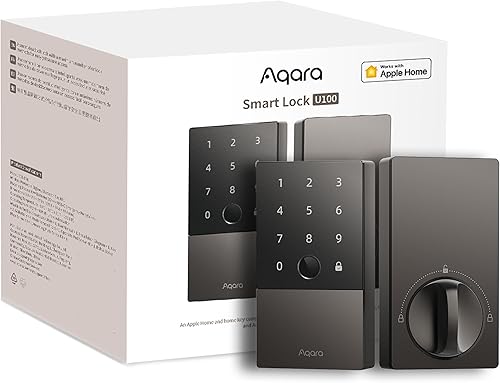
- Aqara U100 ($180–200) — The most feature-packed option at this price. Fingerprint reader, Apple Home Key, Matter, Thread. The best overall choice if your deadbolt is compatible.
- August Wi-Fi Smart Lock ($150–180) — The cheapest way to get a functional smart lock with remote access. Built-in Wi-Fi, retrofit install, simple and reliable.
Aqara U100
August Wi-Fi Smart Lock
$200–$300: More features and flexibility
This tier adds keypads, touchscreens, modular connectivity, and wider ecosystem support. Worth it if you need features the budget tier does not offer.
- Yale Assure Lock 2 ($200–280) — Swappable radio modules, the widest ecosystem support, available in keypad and touchscreen variants. The price varies depending on which module and style you choose.
- Level Lock+ ($250–330) — Invisible design, Apple Home Key, Thread. You are paying for engineering and aesthetics, not for more features than cheaper options.
$300 and up: Premium picks
At this price, you get commercial-grade build quality and the most polished experience.
- Schlage Encode Plus ($280–330) — The best-built smart lock you can buy. Apple Home Key, built-in Wi-Fi, solid keypad, no hub needed. If build quality and reliability are your top priorities and you have landlord permission for a full replacement, this is the lock.
For most apartment renters, the under-$200 tier makes the most sense. You get everything you need without overinvesting in a lock you might swap out when you move to a place with a different deadbolt or door configuration.
Step 6: Plan for move-out day
The moment you install a smart lock, you should be thinking about the day you remove it. A little preparation now saves stress and money later.
How to store original hardware
Put every piece of the original lock hardware — screws, strike plate, thumbturn, mounting plates — into a labeled ziplock bag. Write the apartment address on the bag. Store it somewhere stable: a closet shelf, a moving box you will not open, or a drawer you use for important items. Do not throw it in a junk drawer where pieces can separate and disappear.
If you replaced the full deadbolt, the original deadbolt assembly is the critical piece. Keep it intact and assembled if possible — it makes reinstallation much faster.
Reinstallation tips
Give yourself at least 30 minutes for reinstallation on move-out day, even if the original installation only took 10 minutes. You will be tired, rushed, and working in reverse. For retrofit locks, reinstallation is straightforward — remove the smart lock, reattach the original thumbturn. For full replacements, you are swapping the entire deadbolt assembly back, which means aligning the bolt, strike plate, and both sides of the hardware.
Test the lock multiple times after reinstallation. Make sure the deadbolt extends and retracts smoothly, the key works from outside, and the door latches properly. A lock that does not work on move-out day is a security deposit deduction waiting to happen.
What to do with the smart lock after moving
Factory-reset the smart lock before installing it at your new apartment. This clears all saved fingerprints, access codes, and connected accounts. Every lock handles resets differently — check the manufacturer's app or manual for the specific steps. Once reset, the lock is ready to pair with your phone and configure fresh for your new door.
If your new apartment has a different deadbolt size or door thickness, the lock may not be compatible. Check compatibility before assuming it will work. If it does not fit, smart locks hold their resale value reasonably well on the secondary market.
Get the No-Subscription Smart Home Guide
The best smart home devices that work without monthly fees — locks, cameras, doorbells, and more. Free download.
No spam. Unsubscribe anytime.
Common mistakes to avoid
Buying without checking deadbolt compatibility
This is the number one mistake. Every smart lock has specific requirements for door thickness, backset distance, and deadbolt dimensions. Retrofit locks are especially particular. Use the manufacturer's compatibility checker before ordering — returning a smart lock because it does not fit wastes time and shipping costs. The Aqara U100 and August both have online compatibility tools that take two minutes to complete.
Choosing an ecosystem-incompatible lock
A HomeKit-only lock in an all-Alexa household is a paperweight with a motor. A lock without Google Home support next to a Nest Hub is frustrating. Check ecosystem compatibility before you look at any other feature. This is the one spec that makes or breaks your daily experience.
Forgetting to save original hardware
It sounds obvious, but people lose original lock hardware constantly. The moment you remove anything from your door, bag it, label it, and store it in a dedicated spot. If you lose the original deadbolt on a full replacement, expect to pay $75 to $200 in security deposit deductions for a locksmith to install a new one.
Ignoring battery type and availability
AA batteries are cheap and available everywhere. CR123A and CR2 batteries are not — they cost $8 to $15 for a pair and you may need to order them online. Factor in ongoing battery costs when comparing locks. A lock that uses AA batteries and lasts 12 months is meaningfully cheaper to maintain than one using CR123A batteries that lasts 6 months.
Over-spending on features you will not use
A $300 lock with Apple Home Key is wasted money if you use Android. A keypad you never use because you always unlock with your phone added $50 to the price for nothing. Be honest about which features you will actually use daily, and buy accordingly. For most apartment renters, a $150 to $200 retrofit lock does everything they need.
Related Guides
Frequently asked questions
Do I need my landlord's permission for a smart lock?
What is the easiest smart lock to install in an apartment?
Can I take my smart lock when I move?
Are smart locks safe for apartments?
Do smart locks work during power outages?
What if my apartment has a non-standard deadbolt?
Should I get a smart lock with a keypad or fingerprint reader?
The bottom line
Choosing a smart lock for your apartment comes down to six decisions: check your lease, pick an installation type, choose your connectivity, match your ecosystem, set your budget, and plan for move-out. Work through them in order and the right lock becomes obvious.
For most apartment renters, a retrofit lock in the under-$200 range is the right answer. The Aqara U100 is the best overall choice — it installs in 15 minutes, supports Apple Home Key and Matter, includes a fingerprint reader, and costs under $200. If you need something cheaper or simpler, the August Wi-Fi Smart Lock at around $150 is the most affordable path to a smart lock with remote access.
If your lease allows a full deadbolt replacement and you want the widest ecosystem support, the Yale Assure Lock 2 covers every platform. For Apple households willing to pay a premium, the Schlage Encode Plus offers unmatched build quality and the best Home Key experience.
Whatever you choose, check deadbolt compatibility before ordering, save your original hardware in a labeled bag, and always keep a physical key as backup. Do those three things and your smart lock experience will be smooth from installation day through move-out day.