Quick answer
The Aqara U100 is the best smart lock under $200 in 2026. It delivers Apple Home Key, a built-in fingerprint reader, Matter and Thread support, and retrofit installation — all for around $189 with no subscription. For the lowest price, the August Wi-Fi Smart Lock at around $130 gets you built-in Wi-Fi and a dead-simple retrofit install.
Spending under $200 on a smart lock used to mean settling for Bluetooth-only connectivity, no keypad, and barebones app support. That is no longer the case. The current generation of sub-$200 smart locks includes models with Apple Home Key, fingerprint readers, Matter support, and full smart home integration. You no longer need to spend $300 to get a lock that actually works well.
We tested and scored every smart lock under $200 available in 2026 across seven categories: value, ecosystem compatibility, ease of installation, reliability, privacy, subscription burden, and design. Every lock in this guide works fully without any monthly subscription, and every one of them can be purchased and installed for under $200.
Here are the five best smart locks under $200, ranked by overall score.
At-a-glance winners
Aqara U100
Apple Home Key, fingerprint reader, Matter/Thread, retrofit install. The most feature-packed lock under $200.
August Wi-Fi Smart Lock
Built-in Wi-Fi, retrofit install, and the lowest price in the group. Simple and effective.
Yale Assure Lock SL
Sleek key-free touchscreen design. No physical keyhole means a clean exterior look.
Schlage Sense
Native HomeKit support, Schlage build quality, and a physical keypad. Solid and dependable.
Level Lock+
Completely invisible from outside. Apple Home Key, Thread, and all the smarts hidden inside the bolt.
How they compare
| Product | Score | Price | Subscription |
|---|---|---|---|
| Aqara U100 Best Overall | 8.6 | US $139.99 / CA $190 | No |
| August Wi-Fi Smart Lock Best Budget | 8.2 | US $109.00 / CA $252 | No |
| Yale Assure Lock SL Best Touchscreen | 7.9 | US $198.94 / CA $465 | No |
| Schlage Sense Best HomeKit Value | 7.7 | US $198.94 / CA $240 | No |
| Level Lock+ Best Invisible Design | 7.5 | US $249.99 / CA $330 | No |
How we test and score smart locks
Every lock is scored across seven weighted categories: value (20%), ecosystem compatibility (20%), ease of installation (15%), reliability (15%), privacy (10%), subscription burden (10%), and design (10%). For this guide, we weight value highest because the entire point is finding the best lock within a strict budget. Ecosystem compatibility is equally important because a lock that does not work with your smart home platform is a lock you will stop using.
We test each lock over a minimum of two weeks, evaluating daily unlock reliability, app responsiveness, battery drain, and integration with HomeKit, Alexa, and Google Home. We also time the installation process, check deadbolt compatibility across multiple door types, and verify that every advertised feature works without a subscription.
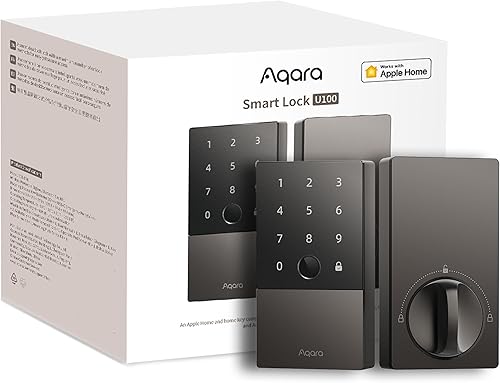
1. Aqara U100 — Best overall under $200
Apple Home Key, a fingerprint reader, Matter and Thread support, and retrofit installation — all for under $200. Nothing else in this price range comes close.
Why it stands out
The Aqara U100 packs an absurd amount of technology into a lock that costs under $200. It is the only smart lock at this price point with Apple Home Key, meaning you can tap your iPhone or Apple Watch to unlock without opening an app. The built-in fingerprint reader is fast and accurate, recognizing your print in under a second. Add Matter and Thread support, and you have a lock that is more future-proof than models costing twice as much.
Installation is a straightforward retrofit. You remove the interior thumbturn from your existing deadbolt and mount the Aqara U100 in its place. The exterior of your door stays completely unchanged, and your original physical key still works. The whole process takes about 15 minutes with a screwdriver. For renters, this is ideal — no landlord permission needed, and you can swap back the original hardware when you move out.
Key specs
- Connectivity: Bluetooth 5.0, Thread, Matter
- Unlock methods: Fingerprint, keypad, Apple Home Key (NFC), app, physical key
- Power: CR123A batteries, approximately 8 months
- Installation: Retrofit (interior only, keeps existing exterior hardware)
- Price: $180-$200
- Subscription: None required
Pros
- + Apple Home Key support at the lowest price available
- + Built-in fingerprint reader is fast and reliable
- + Retrofit installation — no changes to exterior hardware
- + Matter and Thread for future-proofing
- + Works with HomeKit, Alexa, and Google Home
Cons
- - Limited deadbolt compatibility — check before buying
- - No built-in Wi-Fi (needs Thread border router for remote access)
- - CR123A batteries are less common and pricier than AA
- - No SmartThings support
Who should buy it
Anyone who wants the most capable smart lock available under $200. It is particularly strong for Apple households thanks to Home Key, but it works well with Alexa and Google Home too. If you have a HomePod Mini or Apple TV 4K acting as a Thread border router, you get reliable remote access without the lock needing built-in Wi-Fi.
Who should skip it
People with incompatible deadbolts (always check Aqara's compatibility tool first), SmartThings users, or anyone who needs built-in Wi-Fi for remote access without additional hardware. If remote access is critical and you do not have a Thread border router, the August Wi-Fi Smart Lock is a better fit.
Aqara U100
2. August Wi-Fi Smart Lock — Best budget pick
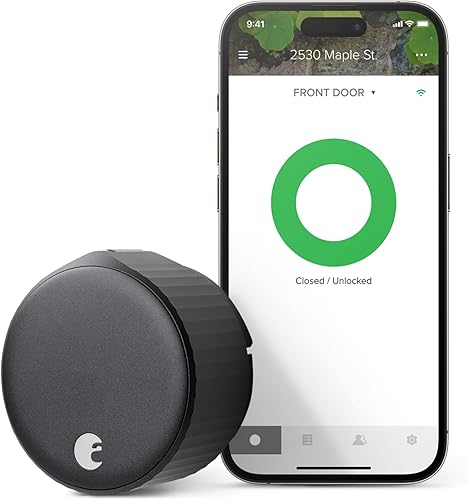
The cheapest path to a smart lock with built-in Wi-Fi and remote access. Retrofit install, compact design, and no hub required.
Why it stands out
The August Wi-Fi Smart Lock is the most affordable smart lock worth buying in 2026. At around $130 on sale, it undercuts the competition significantly while still delivering the features that matter: built-in Wi-Fi for remote access, retrofit installation that takes under 10 minutes, and reliable app-based locking and unlocking. There is no hub, no bridge, and no additional hardware to buy.
The auto-unlock feature is the August's secret weapon. Using your phone's GPS, the lock detects when you arrive home and unlocks automatically as you approach. It works surprisingly well in daily use and makes the lack of a keypad less noticeable. Auto-lock is also reliable, automatically locking behind you after a configurable delay. For a set-it-and-forget-it smart lock experience, the August delivers.
Key specs
- Connectivity: Wi-Fi, Bluetooth
- Unlock methods: App, auto-unlock (GPS), physical key (existing)
- Power: 2x CR123A batteries, approximately 6 months
- Installation: Retrofit (interior only)
- Price: $130-$170
- Subscription: None required
Pros
- + Lowest price of any lock in this guide
- + Built-in Wi-Fi — remote access without any hub
- + Fastest and easiest installation of any smart lock
- + Auto-unlock and auto-lock work reliably
- + Compact and clean-looking design
Cons
- - No native HomeKit support (requires separate bridge)
- - No keypad — phone or physical key only
- - Shorter battery life than competitors (~6 months)
- - Wi-Fi can be unreliable on some mesh networks
- - No fingerprint reader
Who should buy it
Budget-conscious buyers who use Alexa or Google Home and want the simplest possible smart lock setup. It is ideal if you want remote access without buying extra hardware and prefer a lock that installs in minutes without modifying your door. The auto-unlock feature alone makes daily use feel effortless.
Who should skip it
Apple HomeKit users (the required August Connect bridge adds $50+ and defeats the budget advantage), anyone who needs a keypad for guest access codes, or people with weak Wi-Fi at their front door. If you need HomeKit, the Aqara U100 is worth the extra $50.
August Wi-Fi Smart Lock (4th Gen)
3. Yale Assure Lock SL — Best touchscreen keypad
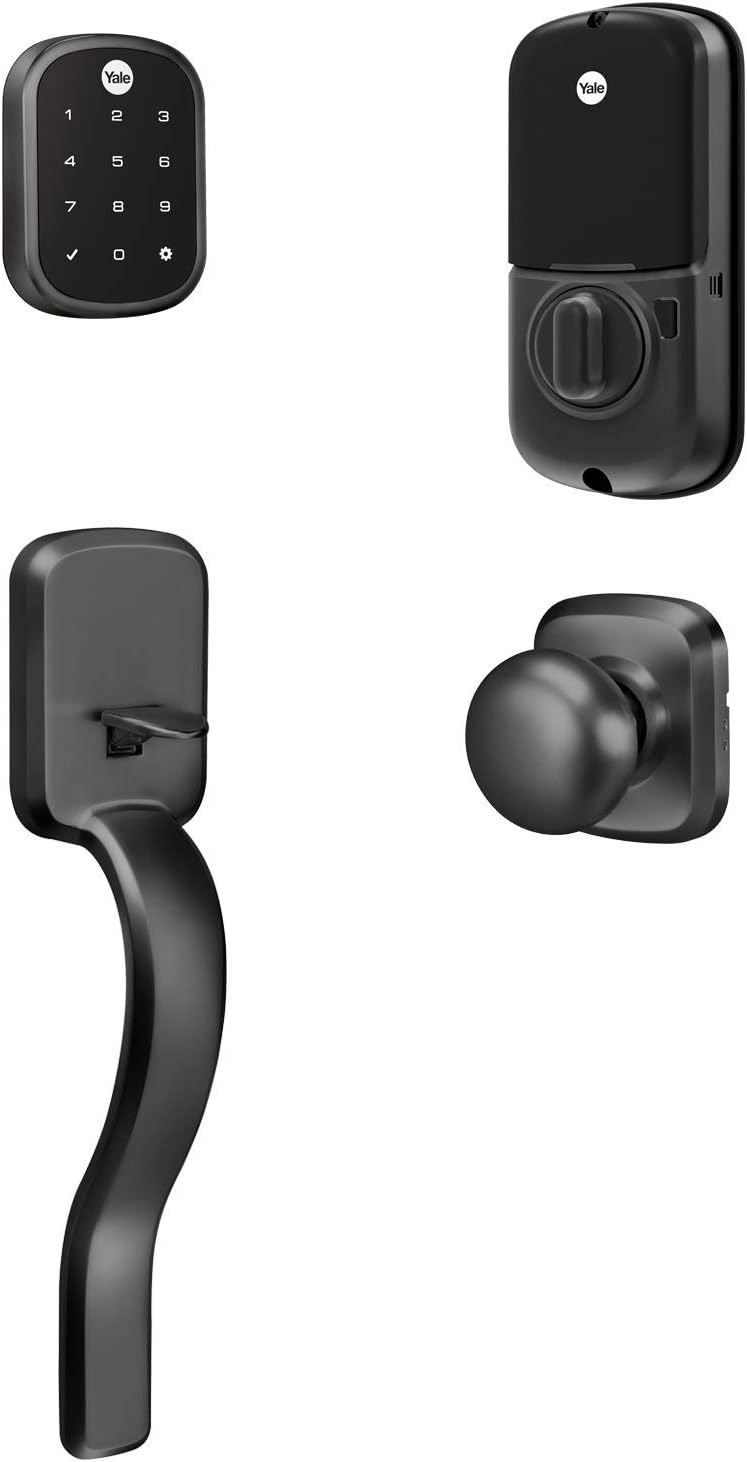
A sleek, key-free touchscreen deadbolt with no visible keyhole. Create unique access codes for family, guests, and service providers.
Why it stands out
The Yale Assure Lock SL takes a different approach from the retrofit locks in this guide. It replaces your entire deadbolt with a clean, modern touchscreen panel that has no physical keyhole on the exterior. This is a fully key-free design. You unlock with access codes, the app, or voice assistant commands. The touchscreen is responsive and backlit, easy to use in the dark.
Access code management is where the Yale shines at this price point. You can create up to 25 unique codes, set schedules for when each code works (weekdays only, specific hours), and receive notifications when codes are used. This makes it excellent for managing guest access, dog walkers, or cleaning services. The lack of a physical keyhole also eliminates lock-picking as a concern, though you lose the backup of a physical key.
Key specs
- Connectivity: Bluetooth (Z-Wave or Wi-Fi with optional module)
- Unlock methods: Touchscreen keypad, app, voice assistants
- Power: 4x AA batteries, approximately 12 months
- Installation: Full deadbolt replacement
- Price: $160-$200
- Subscription: None required
Pros
- + Sleek key-free touchscreen design
- + Up to 25 unique access codes with scheduling
- + Long battery life with standard AA batteries
- + Works with Alexa, Google Home, and SmartThings
- + Clean exterior with no visible keyhole
Cons
- - Full deadbolt replacement required
- - No native HomeKit support
- - Bluetooth-only without optional module (no remote access)
- - No physical key backup
- - Wi-Fi module adds to the total cost
Who should buy it
Anyone who wants code-based entry with scheduling and does not mind replacing the full deadbolt. The Yale Assure Lock SL is particularly good for households that need to give access to multiple people — cleaners, dog walkers, relatives — with different schedules. If you use Alexa or Google Home and want a keypad lock under $200, this is the strongest option.
Who should skip it
Renters who cannot replace the deadbolt, HomeKit users, or anyone uncomfortable with a lock that has no physical key backup. If the power dies and you have not set up an alternative entry method, you are calling a locksmith. Also skip if you need remote access out of the box — the base model is Bluetooth-only.
Yale Assure Lock SL
4. Schlage Sense — Best HomeKit value
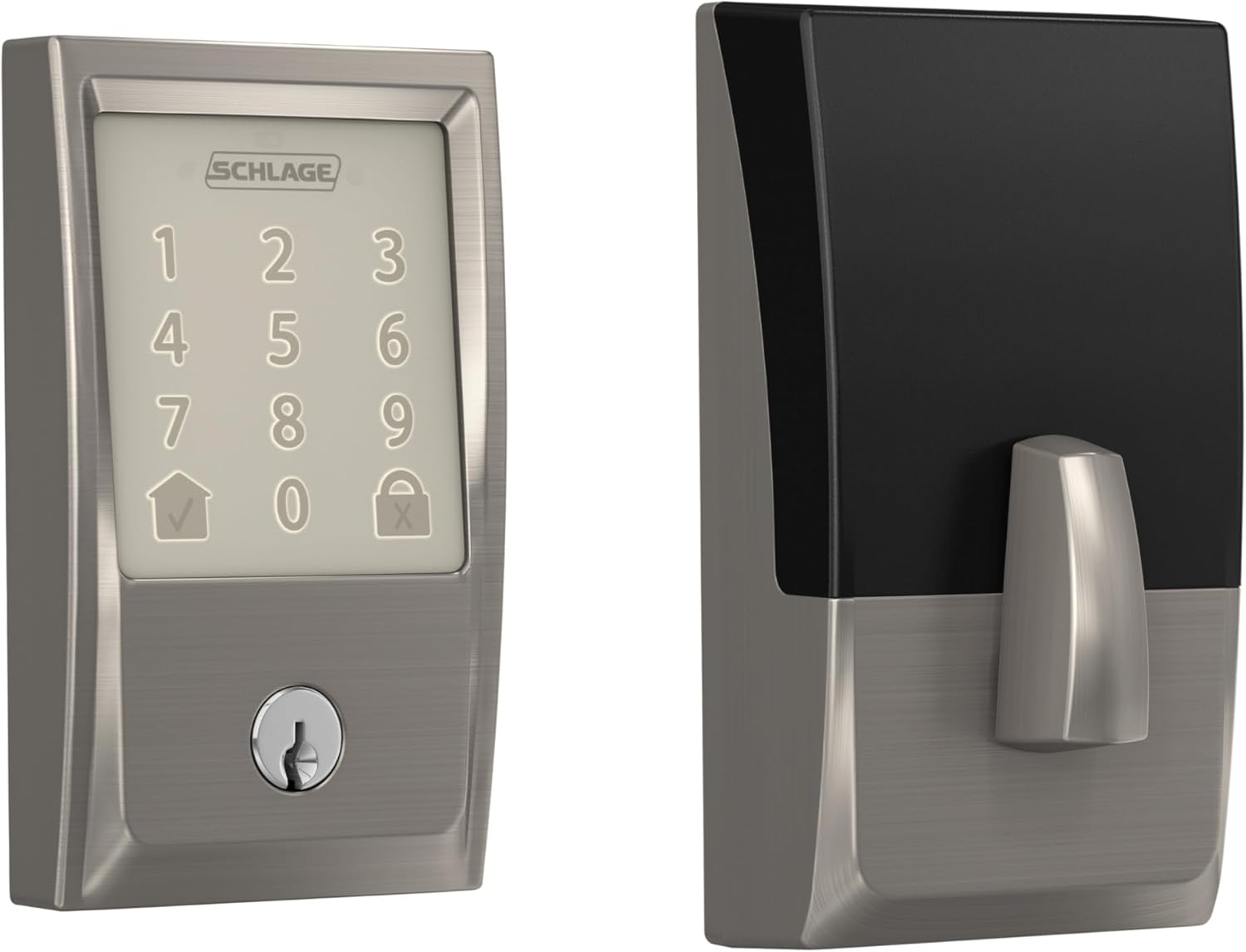
Native HomeKit support, Schlage build quality, and a physical keypad with backup key — all comfortably under $200. The dependable choice for Apple households on a budget.
Why it stands out
The Schlage Sense is the most affordable smart lock with native HomeKit support that does not cut corners on physical security. Schlage has been making locks since 1920, and that heritage shows in the build quality. The deadbolt throw is solid, the keypad has a satisfying tactile response, and the entire unit feels like it belongs on a front door. It is not the most modern-looking lock, but it is one of the most trustworthy.
HomeKit integration works well through Bluetooth, letting you control the lock from the Apple Home app and include it in automations and scenes. Siri voice control is reliable. You also get Alexa and Google Home support, making this a good option for mixed-ecosystem homes. The physical keypad stores up to 30 access codes, and a traditional keyhole provides backup entry if the electronics ever fail.
Key specs
- Connectivity: Bluetooth (Wi-Fi adapter sold separately)
- Unlock methods: Keypad, app, Siri/Alexa/Google, physical key
- Power: 4x AA batteries, approximately 12 months
- Installation: Full deadbolt replacement
- Price: $150-$190
- Subscription: None required
Pros
- + Native HomeKit support under $200
- + Schlage build quality and security reputation
- + Physical keypad plus backup key entry
- + AA batteries last about 12 months
- + Works with HomeKit, Alexa, and Google Home
Cons
- - Bulkier design than modern competitors
- - No Apple Home Key support
- - Bluetooth-only without optional Wi-Fi adapter
- - Full deadbolt replacement required
- - No Matter or Thread support
Who should buy it
Apple HomeKit users on a budget who want a reliable lock from a trusted security brand. The Schlage Sense is the right choice if you value physical security and build quality over cutting-edge features. It is also a good pick for anyone who wants both a keypad and a physical key backup — the belt-and-suspenders approach to smart lock access.
Who should skip it
Anyone who wants a sleek, modern design. The Schlage Sense looks like a traditional lock with a keypad bolted on — functional but not winning any design awards. Also skip if you need remote access out of the box, as the Wi-Fi adapter is an additional purchase. For a more modern HomeKit lock, the Aqara U100 is a better fit.
Schlage Sense
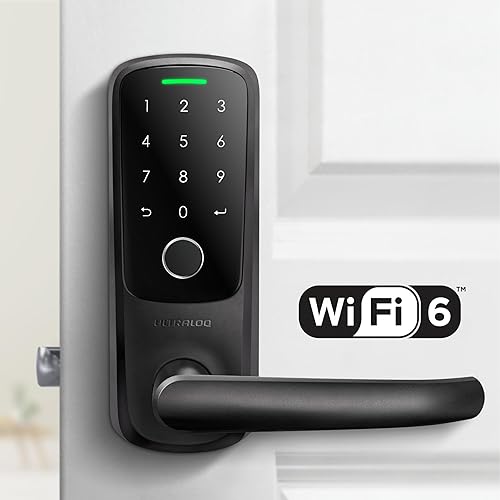
5. Level Lock+ — Best invisible design
Every smart lock component hidden inside the bolt itself. From the outside, your door looks completely normal. No one will know it is a smart lock.
Why it stands out
Level performed a genuine engineering achievement with the Lock+. The motor, battery, Bluetooth radio, and Thread radio are all packed inside the deadbolt bolt itself. The exterior of your door shows nothing — no keypad, no touchscreen, no visible electronics. It looks like a completely ordinary deadbolt. For people who care about aesthetics or live in buildings with strict appearance rules, this is the only smart lock that truly disappears.
Despite its compact size, the Level Lock+ supports Apple Home Key for tap-to-unlock with your iPhone or Apple Watch, and Thread connectivity for Matter support. Battery life is impressive at around 12 months from a single CR2 battery, thanks to the low-power Thread protocol. The touch-sensitive interior panel lets you lock and unlock by tapping the inside of the lock — a nice alternative to reaching for your phone.
Key specs
- Connectivity: Bluetooth, Thread
- Unlock methods: Apple Home Key (NFC), app, physical key, touch-sensitive interior
- Power: CR2 battery, approximately 12 months
- Installation: Replaces deadbolt internals (exterior appearance unchanged)
- Price: $180-$200
- Subscription: None required
Pros
- + Completely invisible from the outside
- + Apple Home Key for tap-to-unlock
- + Thread and Matter support for future-proofing
- + Excellent battery life (~12 months)
- + Award-winning industrial design
Cons
- - No keypad — cannot enter access codes
- - No Alexa or Google Home support
- - Bluetooth-only range without a Thread border router
- - Fewer features per dollar than the Aqara U100
- - Requires specific deadbolt dimensions
Who should buy it
Design-conscious Apple users who want a smart lock without any visible evidence of it. The Level Lock+ is the right pick if your building has appearance restrictions, if you hate the look of keypad-equipped locks, or if you simply want the cleanest possible door hardware. It is also a solid choice for Apple Home Key enthusiasts who already have a Thread border router at home.
Who should skip it
Anyone who needs a keypad, uses Alexa or Google Home, or wants the most features for their money. The Aqara U100 costs about the same and offers a fingerprint reader, keypad, and wider ecosystem support. You are paying a premium for the Level's invisible design and engineering — not for more functionality.
Level Lock+
What to look for in a smart lock under $200
Retrofit vs. full replacement
This is the biggest decision at any price point. Retrofit locks (Aqara U100, August, Level Lock+) replace only the interior portion of your deadbolt, leaving the exterior unchanged and your physical key intact. Full-replacement locks (Yale Assure Lock SL, Schlage Sense) swap out the entire deadbolt assembly, which gives you a keypad but changes your door's exterior. Renters should lean toward retrofit models. Homeowners have more flexibility.
Ecosystem compatibility
Match the lock to your smart home. Apple HomeKit users should look at the Aqara U100, Schlage Sense, or Level Lock+. Alexa and Google Home users have the widest selection — the August and Yale both integrate well. If you run SmartThings, the Yale Assure Lock SL is your only option in this price range. Do not assume Matter will solve compatibility issues today — while it is the future, not every platform fully supports Matter locks yet.
Remote access
Not every smart lock offers remote control out of the box. The August Wi-Fi Smart Lock has built-in Wi-Fi for immediate remote access. The Aqara U100 and Level Lock+ use Thread, which provides remote access only if you have a Thread border router (HomePod Mini, Apple TV 4K, or similar). The Yale Assure Lock SL and Schlage Sense are Bluetooth-only by default and require optional modules for remote access. Know what you need before buying.
Battery type and life
Smart locks under $200 use three main battery types: AA (Yale, Schlage), CR123A (Aqara, August), and CR2 (Level). AA batteries are cheapest and most available. CR123A and CR2 batteries cost more but are available at any hardware store. Battery life ranges from 6 months (August, due to Wi-Fi) to 12 months (Yale, Schlage, Level). All locks in this guide warn you well before batteries die.
Keypad vs. no keypad
A keypad lets you create access codes for family, guests, and service providers. The Yale Assure Lock SL and Schlage Sense have keypads. The Aqara U100 has both a keypad and fingerprint reader. The August and Level Lock+ have no keypad — you unlock via app, auto-unlock, Apple Home Key, or physical key only. If you regularly need to give access to other people, a keypad is worth prioritizing.
Common mistakes to avoid
Not checking deadbolt compatibility first
Every smart lock has specific requirements for deadbolt brand, backset measurement, and door thickness. This is especially true for retrofit locks like the Aqara U100 and Level Lock+, which must fit inside your existing deadbolt hardware. Every manufacturer provides an online compatibility checker. Use it before ordering. Returning a smart lock wastes time and shipping costs.
Assuming all smart locks have remote access
Bluetooth-only locks like the base Yale Assure Lock SL and Schlage Sense only work within about 30 feet. If you want to check your lock from work or let someone in while you are away, you need either built-in Wi-Fi (August), a Thread border router (Aqara, Level), or an optional Wi-Fi module (Yale, Schlage). Do not buy a Bluetooth-only lock expecting remote access.
Ignoring battery costs over time
A lock that uses two CR123A batteries every six months costs more to maintain than one that uses four AA batteries once a year. It is not a huge expense, but it adds up. Factor ongoing battery costs into your decision, especially if you are comparing locks at similar price points.
Buying features you will not use
Apple Home Key is a great feature — if you have an iPhone. Thread and Matter are future-proof — if you have compatible hardware. A fingerprint reader is convenient — if you do not always wear gloves. Match the lock to how you actually live, not to a spec sheet. The August Wi-Fi Smart Lock costs $60 less than the Aqara U100 and may be all you actually need.
Forgetting about guest access
If you regularly have guests, dog walkers, or cleaning services, think about how they will get in. Locks without keypads (August, Level Lock+) require you to unlock remotely via the app or share a virtual key. Locks with keypads (Yale, Schlage, Aqara) let you create dedicated codes. Scheduled codes that only work at specific times are even better for recurring visitors.
Get the No-Subscription Smart Home Guide
The best smart home devices that work without monthly fees — locks, cameras, doorbells, and more. Free download.
No spam. Unsubscribe anytime.
Related Guides
Frequently asked questions
Can you get a good smart lock for under $200?
Do cheap smart locks compromise on security?
Which smart lock under $200 works with Apple HomeKit?
Do smart locks under $200 require a monthly subscription?
What is the difference between retrofit and full-replacement smart locks?
How long do batteries last in budget smart locks?
Can I control a smart lock under $200 remotely?
Are smart locks under $200 compatible with Matter?
What should I do if my smart lock does not fit my door?
The bottom line
The Aqara U100 is the best smart lock under $200 in 2026. No other lock at this price delivers Apple Home Key, a fingerprint reader, Matter and Thread support, and a retrofit installation that leaves your door untouched. At around $189, it offers flagship-level features at a mid-range price.
If budget is your primary concern, the August Wi-Fi Smart Lock at around $130 is the best value in the category. Built-in Wi-Fi, retrofit installation, and auto-unlock make it a dead-simple smart lock that works without any extra hardware.
For code-based entry with a touchscreen keypad, the Yale Assure Lock SL is the strongest option under $200. Its key-free design, access code scheduling, and wide ecosystem support make it ideal for households that need to manage access for multiple people.
The Schlage Sense is the pick for Apple HomeKit users who want a trusted security brand with a physical keypad and key backup. And the Level Lock+ is unmatched for anyone who wants a completely invisible smart lock that looks like an ordinary deadbolt.
Every lock in this guide works without a subscription, and every one of them delivers genuine smart home functionality for under $200. Check your deadbolt compatibility, match the lock to your ecosystem, and stop overpaying for features that should not cost $300.