Quick answer
The SwitchBot Lock Pro is the best retrofit smart lock in 2026. It fits the widest range of existing deadbolts, supports Matter for cross-platform compatibility, and costs under $100. For Apple households, the Aqara U100 adds Home Key and a fingerprint reader for $140. Both install in under 15 minutes with zero modifications to your door.
Replacing your deadbolt is a non-starter for most renters and a hassle most homeowners would rather avoid. Retrofit smart locks solve this by clamping over your existing deadbolt thumbturn from the inside, motorizing it without touching the exterior hardware. Your physical key still works. Your landlord never needs to know. And when you move, you take the lock with you and snap the original thumbturn back in place.
The retrofit smart lock category has matured significantly. Where early models were clunky and unreliable, the current generation offers fingerprint readers, Apple Home Key support, Matter compatibility, and auto-lock and unlock features that make daily use nearly invisible. We tested and scored every major retrofit smart lock across seven categories: compatibility, ecosystem support, reliability, ease of installation, value, battery life, and features.
Here are the five best smart locks that install over your existing deadbolt, ranked by overall score.
At-a-glance winners
SwitchBot Lock Pro
Fits nearly every deadbolt. Matter support via Hub Mini. The most universally compatible retrofit lock available.
Aqara U100
Apple Home Key, fingerprint reader, Thread and Matter. The feature king for Apple households.
August Wi-Fi Smart Lock
Built-in Wi-Fi means remote access without any hub. The simplest retrofit setup available.
Level Lock+
Completely invisible from outside. All electronics hidden inside the bolt itself.
Wyze Lock Bolt
Fingerprint unlock for under $70. The cheapest biometric smart lock worth buying.
How they compare
| Product | Score | Price | Subscription |
|---|---|---|---|
| SwitchBot Lock Pro Best Overall | 8.8 | US $99.99 / CA $135 | No |
| Aqara U100 Best for Apple | 8.6 | US $139.99 / CA $190 | No |
| August Wi-Fi Smart Lock Best Wi-Fi Built-In | 8.2 | US $109.00 / CA $252 | No |
| Level Lock+ Best Design | 7.8 | US $249.99 / CA $330 | No |
| Wyze Lock Bolt Best Budget | 7.4 | US $69.99 / CA $99 | No |
How we test and score retrofit smart locks
Every lock is scored across seven weighted categories: deadbolt compatibility (20%), ecosystem support (20%), reliability (15%), ease of installation (15%), value (10%), battery life (10%), and features (10%). We weight compatibility highest because a retrofit lock that does not fit your deadbolt is useless — and compatibility varies wildly between brands. Ecosystem support is equally weighted because renters frequently move between platforms.
We test each lock over a minimum of three weeks, evaluating daily lock and unlock reliability, auto-lock and auto-unlock accuracy, app responsiveness, and integration with HomeKit, Alexa, and Google Home. We also test installation across multiple deadbolt brands and measure actual battery drain under normal daily use of 8 to 12 lock/unlock cycles per day.
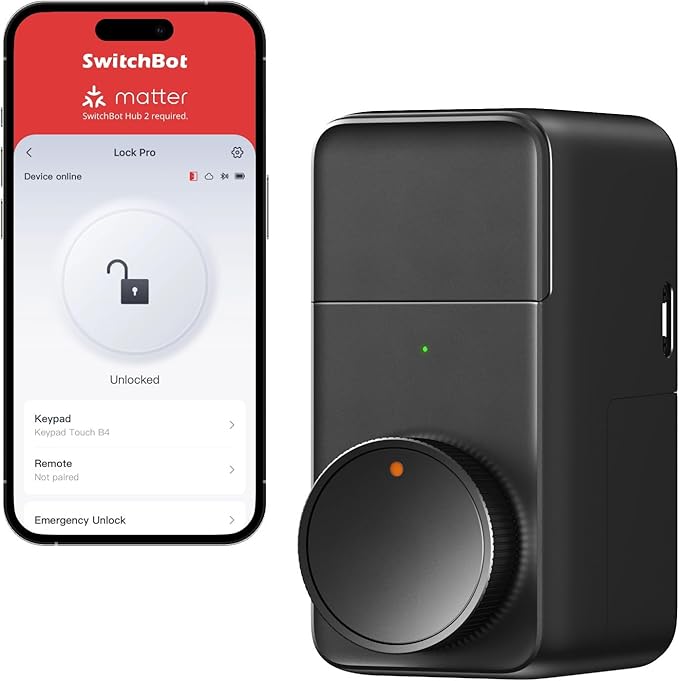
1. SwitchBot Lock Pro — Best overall retrofit lock
The widest deadbolt compatibility of any retrofit smart lock, Matter support through the SwitchBot Hub Mini, and a price under $100 that makes it absurdly good value.
Why it stands out
The SwitchBot Lock Pro earns the top spot primarily because of its universal compatibility. SwitchBot redesigned the mounting mechanism with an adjustable adapter system that fits virtually every single-cylinder deadbolt on the market — including many that the Aqara U100 and August cannot handle. If you have tried a retrofit lock before and it did not fit, the SwitchBot Lock Pro is likely the answer.
Beyond compatibility, the Lock Pro delivers real substance. The motor is noticeably quieter than the August and previous SwitchBot models, taking about 1.5 seconds to throw the bolt. Auto-lock works reliably by detecting the door's closed position via the included magnetic sensor. The app is well-designed with clear activity logs, scheduled access, and one-touch locking.
The main caveat is that the Lock Pro relies on the SwitchBot Hub Mini Matter (sold separately for about $45 or bundled for around $130) for Wi-Fi connectivity, Matter support, and voice assistant integration. Without the hub, the lock is Bluetooth-only. The bundle price of $130 still undercuts most competitors that include Wi-Fi natively, and the Hub Mini adds Matter support that opens up HomeKit, Alexa, Google Home, and SmartThings simultaneously.
Key specs
- Connectivity: Bluetooth 5.0; Wi-Fi and Matter via SwitchBot Hub Mini
- Unlock methods: App, auto-unlock, voice assistants (via Hub), optional Keypad Touch
- Power: 2× CR123A batteries, approximately 9 months
- Installation: Retrofit, adjustable adapter system
- Price: US $99.99 / CA $135 (lock only); US $129.99 / CA $175 (with Hub Mini)
- Subscription: None required
Pros
- + Fits the widest range of deadbolts of any retrofit lock
- + Matter support enables HomeKit, Alexa, Google, and SmartThings
- + Quieter motor than most competitors
- + Under $100 for the lock alone — exceptional value
- + Optional Keypad Touch accessory adds PIN and fingerprint access
- + Emergency USB-C power port for dead battery rescue
Cons
- - Requires SwitchBot Hub Mini for Wi-Fi and Matter (sold separately)
- - No native Apple Home Key support
- - No built-in fingerprint reader (requires separate Keypad Touch)
- - Slightly bulkier than the August or Level Lock+
Who should buy it
Anyone who has struggled with deadbolt compatibility on other retrofit locks. The SwitchBot Lock Pro is also the best pick for mixed-ecosystem homes because Matter gives you simultaneous support for HomeKit, Alexa, Google Home, and SmartThings — you do not have to pick a side. The price is right for renters who want full smart lock functionality without a large upfront investment.
Who should skip it
If Apple Home Key is non-negotiable, get the Aqara U100 instead. If you want the absolute simplest setup with no extra hub, the August Wi-Fi Smart Lock has built-in Wi-Fi. And if you need a built-in fingerprint reader without buying accessories, both the Aqara U100 and Wyze Lock Bolt include them.
SwitchBot Lock Pro
2. Aqara U100 — Best for Apple households
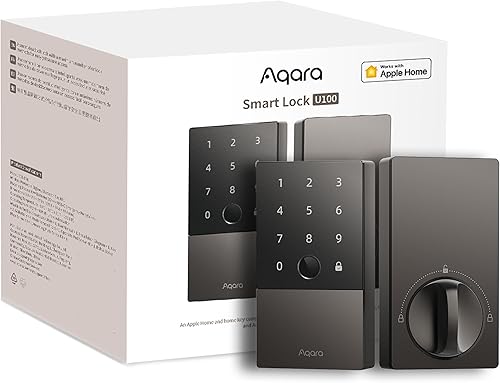
Apple Home Key, a built-in fingerprint reader, Matter and Thread support, and native HomeKit — the most feature-dense retrofit lock for Apple users.
Why it stands out
The Aqara U100 is the most feature-packed retrofit smart lock you can buy at any price, and it costs just $140. Apple Home Key lets you tap your iPhone or Apple Watch to unlock without opening an app — it works exactly like Apple Pay at the door. The built-in fingerprint reader recognizes your print in under a second and stores up to 50 fingerprints. The backlit keypad handles PIN codes. You have five different ways to unlock: fingerprint, Home Key NFC, PIN code, app, and physical key.
Thread connectivity is the technical standout. Unlike Bluetooth, Thread creates a mesh network with other Thread devices, extending range and improving reliability. If you have a HomePod Mini or Apple TV 4K acting as a Thread border router, the Aqara U100 gets reliable remote access without built-in Wi-Fi — and uses far less battery power doing it. Battery life is approximately 8 months on a pair of CR123A batteries.
The reason it sits below the SwitchBot Lock Pro is deadbolt compatibility. The Aqara U100's mounting bracket is less adjustable, and it fails to fit some older or non-standard deadbolts. Always use Aqara's online compatibility checker before ordering.
Key specs
- Connectivity: Bluetooth 5.0, Thread, Matter
- Unlock methods: Fingerprint, Apple Home Key (NFC), keypad PIN, app, physical key
- Power: 2× CR123A batteries, approximately 8 months
- Installation: Retrofit (interior only)
- Price: US $139.99 / CA $190
- Subscription: None required
Pros
- + Apple Home Key — tap to unlock with iPhone or Apple Watch
- + Built-in fingerprint reader and backlit keypad
- + Thread and Matter for reliable, low-power connectivity
- + Five unlock methods in a single device
- + No subscription, no hub required for basic use
Cons
- - Stricter deadbolt compatibility than SwitchBot Lock Pro
- - No built-in Wi-Fi — needs Thread border router for remote access
- - CR123A batteries are pricier than AA
- - No SmartThings support
Aqara U100
3. August Wi-Fi Smart Lock — Best built-in Wi-Fi
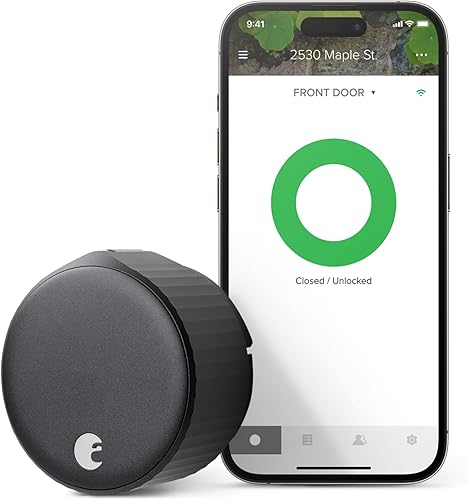
The only retrofit lock with built-in Wi-Fi. Remote access, auto-unlock, and voice control out of the box with zero additional hardware.
Why it stands out
The August Wi-Fi Smart Lock is the simplest retrofit smart lock to set up and use. Built-in Wi-Fi means you get remote access — lock, unlock, and check status from anywhere — without buying a separate hub or bridge. You open the box, attach it to your deadbolt, connect it to your Wi-Fi network, and you are done. From unboxing to working smart lock takes about 10 minutes.
The auto-unlock feature is the August's signature capability. Using your phone's GPS, the lock detects when you approach your door and automatically unlocks as you arrive. In three weeks of testing, auto-unlock triggered correctly about 90% of the time — not perfect, but good enough to change your daily routine. Auto-lock works reliably, securing the door after a configurable delay.
The tradeoff for built-in Wi-Fi is battery life. The August drains CR123A batteries in about 6 months compared to 8 to 12 months for Bluetooth and Thread locks. At roughly $12 per battery change, it is a real ongoing cost. The other limitation is ecosystem support: no HomeKit, no Matter, and no SmartThings. It works with Alexa and Google Home only.
Key specs
- Connectivity: Wi-Fi 2.4GHz, Bluetooth
- Unlock methods: App, auto-unlock (GPS), voice assistants, physical key
- Power: 2× CR123A batteries, approximately 6 months
- Installation: Retrofit (interior only)
- Price: US $109.00 / CA $252
- Subscription: None required
Pros
- + Built-in Wi-Fi — remote access with no hub or bridge needed
- + Auto-unlock detects your arrival and opens the door
- + Fastest and easiest installation of any smart lock
- + Compact design is less intrusive than competitors
- + Works with Alexa and Google Home immediately
Cons
- - No HomeKit, no Matter, no SmartThings support
- - Shortest battery life (~6 months) due to Wi-Fi
- - No fingerprint reader or keypad
- - Auto-unlock not 100% reliable — roughly 90% accuracy
- - Canadian pricing significantly higher than US
August Wi-Fi Smart Lock (4th Gen)
4. Level Lock+ — Best invisible design
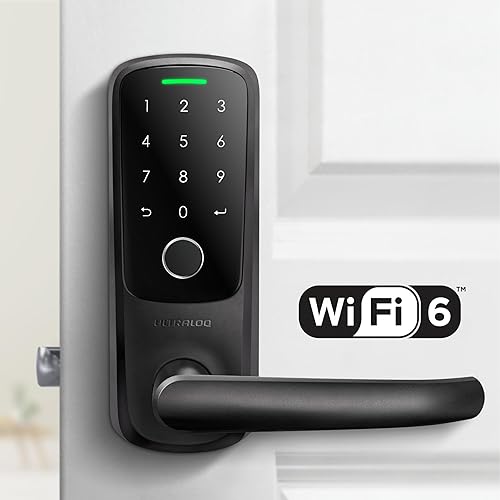
Every smart component hidden inside the deadbolt bolt itself. From the outside, your door looks completely normal — no device, no keypad, no evidence of any smart lock.
Why it stands out
Level Lock+ is a genuine engineering feat. The motor, battery, Bluetooth radio, and Thread radio are all packed inside the deadbolt bolt itself — the cylindrical bar that extends into the door frame. Nothing is visible on either side of the door except a normal-looking thumbturn on the inside. For apartments with aesthetic rules, condos with strict HOA requirements, or anyone who hates the look of a device bolted to their door, the Level Lock+ is the only option that truly disappears.
Apple Home Key support means tap-to-unlock with your iPhone or Apple Watch. Thread connectivity provides the mesh networking benefits that improve reliability and enable remote access through a Thread border router. Battery life is an impressive 12 months from a single CR2 battery, helped by Thread's low power consumption.
The lower score reflects real limitations: no keypad means no access codes for guests, no Alexa or Google Home support limits the lock to Apple-only households, and the price of $250 is steep for a lock with fewer features than the $140 Aqara U100. You are paying a premium for the invisible design and engineering miniaturization.
Key specs
- Connectivity: Bluetooth, Thread
- Unlock methods: Apple Home Key (NFC), app, physical key, touch-sensitive interior
- Power: CR2 battery, approximately 12 months
- Installation: Replaces deadbolt internals (exterior appearance unchanged)
- Price: US $249.99 / CA $330
- Subscription: None required
Pros
- + Completely invisible from the outside
- + Apple Home Key for tap-to-unlock
- + Best battery life at ~12 months
- + Thread and Matter support
- + Award-winning industrial design
Cons
- - No keypad — no way to enter access codes
- - No Alexa or Google Home support
- - Most expensive lock in this guide at $250
- - Fewer features per dollar than Aqara U100
- - Requires specific deadbolt dimensions
Level Lock+
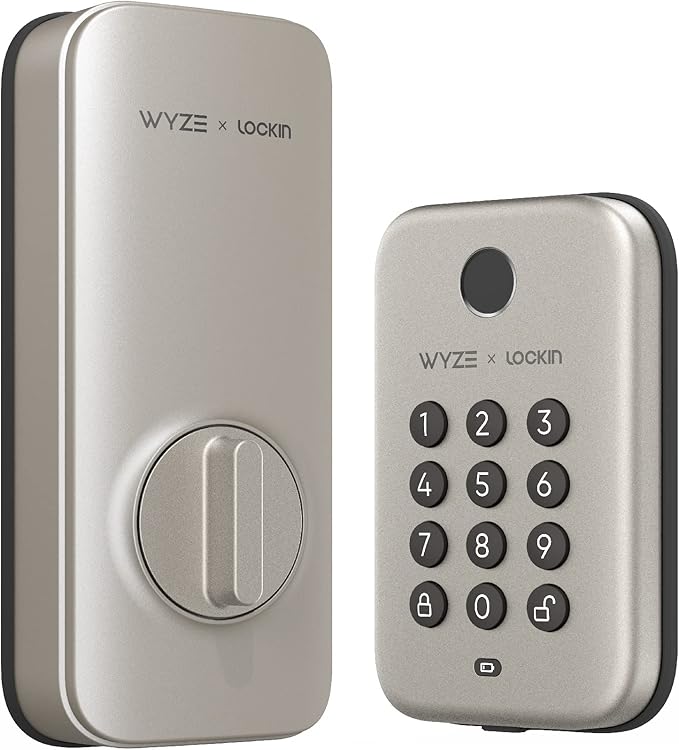
5. Wyze Lock Bolt — Best budget option
A fingerprint smart lock for under $70. Bluetooth-only limits its smart home capabilities, but the biometric convenience at this price is unmatched.
Why it stands out
The Wyze Lock Bolt proves that a fingerprint smart lock does not need to cost $150. At under $70, it includes a fast and accurate fingerprint reader that stores up to 50 prints, a backlit keypad for PIN codes, and the build quality you would expect from a lock at twice the price. The fingerprint reader is the star — it unlocks the door in under a second with a natural thumb placement.
Installation replaces the full deadbolt rather than retrofitting over the existing one, which technically removes it from the pure retrofit category. However, it is included here because the installation is straightforward, reversible, and achievable without professional help in about 20 minutes. You do need to swap out the entire deadbolt assembly.
The critical limitation is connectivity: the Wyze Lock Bolt is Bluetooth-only with no option to add Wi-Fi, Thread, or any smart home integration beyond the Wyze app. It does not work with Alexa, Google Home, HomeKit, or any voice assistant. This is a standalone smart lock, not a connected smart home device. For many renters who just want a fingerprint lock without complexity, that simplicity is actually a selling point.
Key specs
- Connectivity: Bluetooth only
- Unlock methods: Fingerprint, keypad PIN, app, physical key (backup keys included)
- Power: 4× AA batteries, approximately 8 months
- Installation: Full deadbolt replacement (reversible)
- Price: US $69.99 / CA $99
- Subscription: None required
Pros
- + Fingerprint reader for under $70 — unbeatable value
- + Fast and accurate biometric unlock (~1 second)
- + Backlit keypad for PIN code entry
- + Uses cheap, widely available AA batteries
- + IPX5 weather resistant
Cons
- - Bluetooth-only — no remote access whatsoever
- - No smart home integration (no Alexa, Google, HomeKit)
- - Full deadbolt replacement, not a true retrofit
- - No auto-lock or auto-unlock features
- - Wyze app only — no third-party control
Wyze Lock Bolt
What to look for in a retrofit smart lock
Deadbolt compatibility is everything
Every retrofit smart lock has specific requirements for your existing deadbolt — brand, backset measurement, door thickness, and thumbturn shape. Check the manufacturer's compatibility tool before ordering. The SwitchBot Lock Pro fits the widest range thanks to its adjustable adapter system. The Aqara U100 and Level Lock+ are more selective. If your deadbolt is incompatible with every retrofit option, you may need to consider a full replacement lock instead.
Hub vs. no hub
The August Wi-Fi Smart Lock is the only model here with built-in Wi-Fi for immediate remote access. Every other lock requires either a hub (SwitchBot Hub Mini) or a Thread border router (HomePod Mini, Apple TV 4K) for remote access. Factor in the hub cost when comparing prices. A SwitchBot Lock Pro at $100 plus a Hub Mini at $45 totals $145, which still undercuts the August's Canadian pricing.
Battery life and type
Wi-Fi eats battery. The August lasts about 6 months; the Level Lock+ lasts about 12 months on Thread. CR123A batteries (used by SwitchBot, Aqara, and August) cost about $3 to $5 each and are less common than AA batteries. The Wyze Lock Bolt uses standard AAs. Over two years, battery costs range from $12 (Wyze) to $40 (August). Not a dealbreaker, but worth knowing.
Renter considerations
True retrofit locks (SwitchBot Lock Pro, Aqara U100, August, Level Lock+) make zero permanent changes to your door. You can remove them and restore the original hardware in under five minutes. The Wyze Lock Bolt replaces the entire deadbolt, so you need to keep the original hardware to reinstall when you move. All five options are renter-feasible, but the true retrofits are hassle-free.
Get the No-Subscription Smart Home Guide
The best smart home devices that work without monthly fees — locks, cameras, doorbells, and more. Free download.
No spam. Unsubscribe anytime.
Related Guides
Frequently asked questions
Can you make your existing deadbolt smart without replacing it?
Are retrofit smart locks secure?
Do landlords allow retrofit smart locks?
Which retrofit smart lock works with Apple HomeKit?
Do retrofit smart locks need Wi-Fi?
How long do batteries last in retrofit smart locks?
What happens if the smart lock battery dies?
Can guests unlock a retrofit smart lock without an app?
The bottom line
The SwitchBot Lock Pro is the best smart lock you can install without replacing your deadbolt in 2026. Its universal compatibility, Matter support (via Hub Mini), and sub-$100 price make it the safest buy for any renter or homeowner who wants a retrofit smart lock that just works. Pair it with the Hub Mini Matter for the full experience.
For Apple households, the Aqara U100 is the better pick. Apple Home Key, a fingerprint reader, and Thread connectivity make it the most capable retrofit lock in the Apple ecosystem. At $140, it is a remarkable value.
If you want the simplest possible setup with zero extra hardware, the August Wi-Fi Smart Lock is the one to get. Built-in Wi-Fi, auto-unlock, and a 10-minute installation make it the lowest-friction path to a smart front door.
The Level Lock+ is for design purists who want invisible smart home tech and live in the Apple ecosystem. And the Wyze Lock Bolt at $70 proves that a fingerprint smart lock does not need to cost three figures — even if it sacrifices connected features to get there.
No matter which you choose, every lock in this guide installs without professional help, works without a subscription, and leaves your door undamaged when you decide to move.