Quick answer
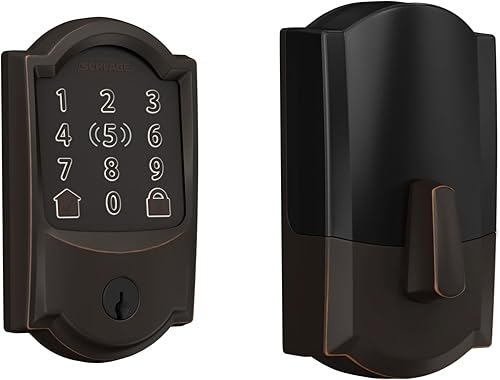
The Schlage Encode Plus is the best HomeKit smart lock in 2026. It supports Apple Home Key, has built-in Wi-Fi so no hub or bridge is required, features an ANSI Grade 1 security rating, and includes a keypad for code-based entry. If you want Home Key at a lower price, the Aqara U100 at around $190 is the best value with fingerprint and Thread support.
Finding a smart lock that works well with HomeKit used to be a frustrating exercise. Apple's strict certification requirements meant fewer options, higher prices, and long waits for firmware updates. In 2026, the landscape is dramatically better. Apple Home Key turns your iPhone and Apple Watch into secure digital keys. Thread support means locks communicate faster and more reliably through your HomeKit hub. And Matter is starting to bridge the gap between ecosystems without sacrificing the Apple-native experience.
But not all HomeKit locks are created equal. Some support Home Key while others do not. Some need a separate bridge or hub for HomeKit connectivity. Some offer Thread for fast local communication, while others rely on Bluetooth alone and feel sluggish. The differences matter when you are trusting a smart lock with your home security.
We tested every HomeKit-compatible smart lock available in early 2026, focusing specifically on how each one performs within the Apple ecosystem — Home app integration, Siri control, Home Key support, Thread connectivity, and automation reliability. Here are the five best.
At-a-glance winners
Schlage Encode Plus
Apple Home Key, built-in Wi-Fi, ANSI Grade 1, keypad. The complete HomeKit lock.
Aqara U100
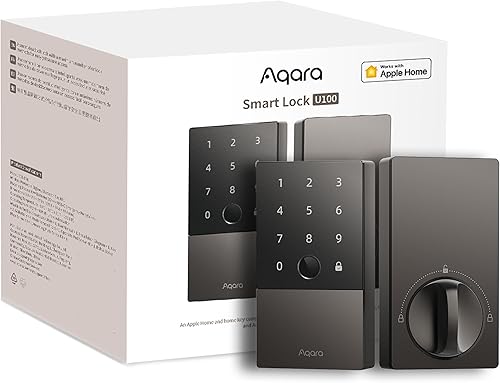
Home Key + fingerprint + Thread at under $200. Best value for Apple households.
Yale Assure Lock 2
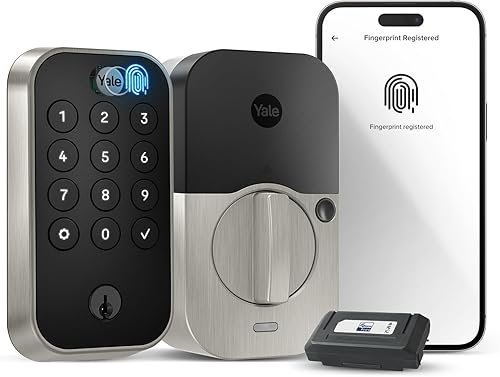
Swappable radio modules for HomeKit, Matter, Wi-Fi, or Bluetooth. Future-proof flexibility.
Level Lock+
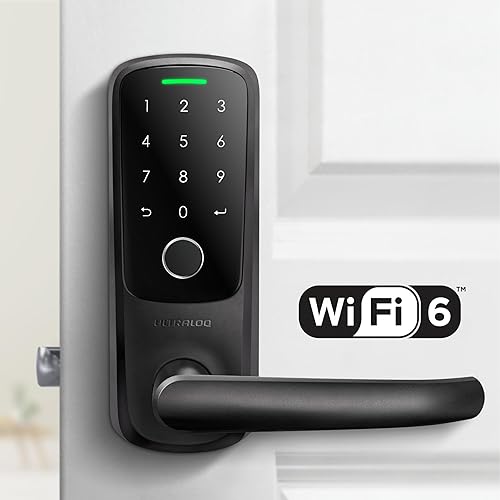
Invisible smart lock with Home Key and Thread. Looks like a regular deadbolt.
August Wi-Fi Smart Lock
Cheapest retrofit option with built-in Wi-Fi. HomeKit support via bridge.
How they compare
| Product | Score | Price | Subscription |
|---|---|---|---|
| Schlage Encode Plus Best Overall | 8.7 | US $288.15 / CA $330 | No |
| Aqara U100 Best Value | 8.5 | US $139.99 / CA $190 | No |
| Yale Assure Lock 2 Most Versatile | 8.3 | US $219.99 / CA $313 | No |
| Level Lock+ Best Design | 8 | US $249.99 / CA $330 | No |
| August Wi-Fi Smart Lock Budget Pick | 7.6 | US $109.00 / CA $252 | No |
How we test and score HomeKit smart locks
Every lock is scored across six weighted categories: HomeKit integration quality (25%), security and build (20%), Home Key and unlock methods (15%), connectivity and reliability (15%), ecosystem breadth (10%), and value (15%). We weight HomeKit integration highest because this is a HomeKit-focused guide — how the lock performs in the Apple Home app, with Siri, and through automations matters most.
For HomeKit-specific testing, we evaluate Home Key tap-to-unlock speed and reliability, Siri voice command accuracy and latency, Home app status updates (how quickly lock state refreshes), automation execution (auto-lock, geofence-based unlocking, scene integration), and remote access performance through a HomePod Mini home hub. Thread-enabled locks are tested for mesh range and responsiveness compared to Bluetooth-only connections. Each lock is installed on a standard residential door and tested over a 30-day period with daily use.
1. Schlage Encode Plus — Best overall HomeKit smart lock
The gold standard for HomeKit locks. Apple Home Key, built-in Wi-Fi for no-hub remote access, an ANSI Grade 1 security rating, and a full keypad. Nothing else checks every box like this.
Why it stands out
The Schlage Encode Plus was the first smart lock to support Apple Home Key, and it remains the most complete HomeKit lock you can buy. Tap your iPhone or Apple Watch on the lock and it unlocks in under a second. The Home Key experience is seamless — it genuinely feels like using Apple Pay to open your front door. In power reserve mode, Home Key still works even when your phone battery is nearly dead, which is a critical reliability feature.
Built-in Wi-Fi sets the Encode Plus apart from most competitors. You do not need a separate bridge, hub, or extra hardware to get remote access through the Home app. Install the lock, pair it with HomeKit, and you can lock and unlock from anywhere. Most competing HomeKit locks require Bluetooth proximity or a home hub for remote access, but the Encode Plus connects directly to your Wi-Fi router. That said, you still need a home hub (HomePod, Apple TV) for HomeKit automations and sharing.
Security is where Schlage's heritage shines. The Encode Plus carries an ANSI/BHMA Grade 1 rating — the highest residential security grade available. The deadbolt is reinforced, the strike plate is heavy-duty, and the lock has built-in anti-tamper alarms. This is the lock you choose when security is not just a feature but a priority. The full touchscreen keypad supports up to 100 unique access codes, making it practical for families, Airbnb rentals, or anyone who wants code-based backup access.
In the Home app, the Schlage Encode Plus behaves exactly as you would expect. Lock status updates are near-instant over Wi-Fi. Siri commands like "lock the front door" execute reliably. Automations — auto-lock after five minutes, lock all doors at bedtime, unlock when I arrive — work consistently. The Home app shows a clean activity log of lock and unlock events, though it is not as detailed as what you get in the Schlage Home app.
Key specs
- Connectivity: Wi-Fi, Bluetooth
- Apple Home Key: Yes
- Security rating: ANSI/BHMA Grade 1
- Keypad: Yes (touchscreen, up to 100 codes)
- Power: 4x AA batteries
- Installation: Full deadbolt replacement
- Ecosystems: HomeKit, Alexa, Google Home
Pros
- + Apple Home Key with power reserve mode
- + Built-in Wi-Fi — no hub or bridge needed for remote access
- + ANSI Grade 1 security rating — highest residential grade
- + Full touchscreen keypad with 100 access codes
- + Reliable Home app integration and Siri control
Cons
- - Most expensive lock on this list at $280–$330
- - No Thread support — relies on Wi-Fi which uses more battery
- - Bulky exterior profile compared to Level Lock+
- - Wi-Fi drains batteries faster than Bluetooth or Thread locks
Who should buy it
Anyone who wants the best possible HomeKit lock experience and does not mind paying for it. The Encode Plus is particularly strong for homeowners who want a keypad for code-based access — giving codes to house sitters, dog walkers, or delivery people without sharing your Home Key. Airbnb hosts who use HomeKit will appreciate the combination of remote access, temporary codes, and Home Key. If security rating matters to you, the ANSI Grade 1 certification is unmatched by any other lock on this list.
Who should skip it
Renters who cannot replace their exterior door hardware should look at the Level Lock+ or August Wi-Fi Smart Lock instead. If you want Thread connectivity for future-proofing and faster local response, the Aqara U100 or Level Lock+ are better choices. Budget-conscious buyers can get Home Key with the Aqara U100 at nearly half the price, though they will give up the keypad and ANSI Grade 1 rating.
Schlage Encode Plus
2. Aqara U100 — Best value HomeKit lock with Home Key
Apple Home Key, a built-in fingerprint reader, and Thread connectivity — all for under $200. The best bang for your buck in the HomeKit lock category.
Why it stands out
The Aqara U100 delivers an impressive combination of features at a price that undercuts every other Home Key lock by $80 or more. You get Apple Home Key for tap-to-unlock with your iPhone or Apple Watch, a capacitive fingerprint reader that unlocks in under a second, Thread support for fast and reliable HomeKit communication, and Matter compatibility for cross-platform flexibility. At around $190, it is a remarkable value proposition.
The fingerprint reader is the standout feature that no other lock on this list matches. It stores up to 50 fingerprints and recognizes them quickly — typically under 0.5 seconds from touch to unlock. For daily use, fingerprint is often faster and more convenient than pulling out your phone for Home Key or typing a code on a keypad. It is also the best option for kids who do not have iPhones — they can unlock the door with their finger instead of remembering a code.
Thread connectivity means the U100 communicates through your Thread mesh network via a border router like the HomePod Mini. In practice, this translates to noticeably faster lock status updates in the Home app compared to Bluetooth-only locks. When you lock or unlock the U100, the Home app reflects the change within 1-2 seconds. Bluetooth locks can take 5-10 seconds or more to update, which creates an unnerving delay when you are trying to confirm your door is locked as you walk away.
Matter support is a future-proofing bonus. If you ever switch away from Apple, the U100 works with Alexa, Google Home, and other Matter controllers without replacing the lock. You get the best of both worlds — native HomeKit with Home Key today, and Matter portability if your ecosystem preferences change tomorrow.
Key specs
- Connectivity: Bluetooth, Thread, Matter
- Apple Home Key: Yes
- Security rating: ANSI/BHMA Grade 2
- Keypad: No (fingerprint reader + NFC)
- Power: CR123A batteries
- Installation: Full deadbolt replacement (retrofit-friendly)
- Ecosystems: HomeKit, Alexa, Google Home (via Matter)
Pros
- + Apple Home Key at the lowest price point
- + Built-in fingerprint reader — fast and convenient
- + Thread + Matter for fast, reliable, future-proof connectivity
- + Clean, modern design
- + Easy retrofit-style installation despite being a full replacement
Cons
- - No keypad for numeric code entry
- - CR123A batteries are less common than AA
- - Requires Thread border router (HomePod Mini or Apple TV 4K) for best performance
- - ANSI Grade 2 — good but not Grade 1 like Schlage
Who should buy it
Apple households who want Home Key without paying Schlage prices. The fingerprint reader makes this the best lock for families with kids who do not have iPhones. If you already own a HomePod Mini — which doubles as a Thread border router — the U100 takes full advantage of your existing hardware. Anyone who values future-proofing through Matter and Thread should put the U100 at the top of their list.
Who should skip it
If you want a keypad for sharing numeric codes with guests or service people, the Aqara U100 does not have one. The Schlage Encode Plus or Yale Assure Lock 2 are better choices for that use case. If you do not have a Thread border router and do not plan to buy one, you will be limited to Bluetooth connectivity, which works but is slower. And if ANSI Grade 1 security is a hard requirement, the Schlage Encode Plus is the only option on this list that qualifies.
Aqara U100
3. Yale Assure Lock 2 — Most versatile ecosystem support
Swappable radio modules let you choose Wi-Fi, Bluetooth, or Matter connectivity. Works with HomeKit, Alexa, Google Home, and SmartThings. The Swiss Army knife of smart locks.
Why it stands out
The Yale Assure Lock 2's killer feature is its modular radio system. The lock body stays the same, but you can swap in different radio modules to change its connectivity. The Wi-Fi module gives you remote access without a hub. The Bluetooth module offers basic local control. The Matter module adds Thread and cross-platform Matter support. This modular approach means you buy the lock once and upgrade the connectivity later if your needs change — a genuine future-proofing advantage that no other lock offers.
For HomeKit users, the Yale works well but with an important caveat: it does not support Apple Home Key. You can lock and unlock through the Home app, use Siri commands, and set up automations, but you cannot tap your iPhone on the lock to unlock it. This is a meaningful gap if Home Key is a priority for you. However, the Yale compensates with the broadest ecosystem support of any lock on this list — HomeKit, Alexa, Google Home, and SmartThings all work natively.
The touchscreen keypad is excellent. It illuminates when you approach and supports up to 250 unique access codes with scheduling — you can create codes that only work during specific hours or days. For mixed households where some people use iPhones, some use Android, and some use neither, the keypad ensures everyone can get in. The Yale Home app provides detailed access logs showing exactly who entered and when, using which method.
Build quality is solid, with a sleek modern design available in multiple finishes. The lock carries an ANSI/BHMA Grade 2 security rating. Installation is straightforward if you are replacing an existing deadbolt, though it is a full lock replacement rather than a retrofit.
Key specs
- Connectivity: Wi-Fi / Bluetooth / Matter (modular, sold separately)
- Apple Home Key: No
- Security rating: ANSI/BHMA Grade 2
- Keypad: Yes (touchscreen, up to 250 codes with scheduling)
- Power: 4x AA batteries
- Installation: Full deadbolt replacement
- Ecosystems: HomeKit, Alexa, Google Home, SmartThings
Pros
- + Swappable radio modules — upgrade connectivity without replacing the lock
- + Broadest ecosystem support including SmartThings
- + Excellent keypad with 250 scheduled access codes
- + Matter module adds Thread support
- + Multiple finish options to match your door hardware
Cons
- - No Apple Home Key support
- - Radio modules sold separately — adds to total cost
- - Base price is mid-range but total cost with modules can reach $280+
- - No fingerprint reader
Who should buy it
Mixed-ecosystem households that use HomeKit alongside Alexa, Google Home, or SmartThings. The Yale Assure Lock 2 is the only lock that plays nicely with all four major platforms. It is also the best choice for people who want a keypad with advanced scheduling — Airbnb hosts, families with rotating house guests, or anyone who shares access codes frequently. If you are not sure which ecosystem you will be using in two years, the modular radio approach means you will never have to replace the lock itself.
Who should skip it
If Apple Home Key is important to you, the Yale does not have it and there is no module that adds it. The Schlage Encode Plus, Aqara U100, or Level Lock+ are your options for Home Key. If you want the simplest possible HomeKit setup, the modular approach can feel like unnecessary complexity — you have to choose and buy the right module, and troubleshooting connectivity means identifying whether the issue is the lock or the module. For a straightforward HomeKit-first experience, the Schlage or Aqara are simpler choices.
Yale Assure Lock 2
4. Level Lock+ — Best invisible smart lock design
All the smart lock technology hidden inside a lock that looks completely ordinary from the outside. Apple Home Key and Thread in a package no one would ever guess is a smart lock.
Why it stands out
The Level Lock+ solves a problem that most smart lock makers ignore entirely: aesthetics. From the outside, the Level Lock+ looks exactly like a standard deadbolt. There is no bulky exterior housing, no touchscreen keypad, no LED indicators — nothing to signal that it is a smart lock. All the technology is hidden inside the lock body and the interior thumb turn. For design-conscious homeowners who hate the look of chunky smart lock hardware, the Level Lock+ is the only option that truly disappears.
Despite its compact design, the Level Lock+ packs serious HomeKit capability. Apple Home Key works beautifully — you tap your iPhone or Apple Watch on the exterior lock face and it unlocks. It is the same NFC-based system as the Schlage Encode Plus, but embedded in a lock that is a fraction of the size. Thread connectivity means the lock communicates through your HomeKit mesh network for fast, reliable status updates and commands.
Installation is a retrofit — you replace only the interior deadbolt mechanism, keeping your existing exterior hardware. This makes it ideal for renters or anyone who likes their current door hardware. The entire installation takes about 15 minutes with a screwdriver. The CR2 battery fits inside the compact mechanism and lasts approximately one year with average use.
The trade-off for invisible design is the absence of a keypad. There are no physical buttons to press and no codes to type. Your unlock options are Home Key (iPhone/Apple Watch), the Level app, the Home app, Siri, or the physical key that came with your original deadbolt. If your phone dies and you do not have a physical key, you are locked out. This is a meaningful limitation that you need to plan around.
Key specs
- Connectivity: Bluetooth, Thread
- Apple Home Key: Yes
- Security rating: ANSI/BHMA Grade A (ANSI Grade 2 equivalent)
- Keypad: No
- Power: CR2 battery (approximately 1 year)
- Installation: Retrofit (interior only)
- Ecosystems: HomeKit, Matter
Pros
- + Invisible design — looks like a standard deadbolt
- + Apple Home Key support
- + Thread connectivity for fast HomeKit communication
- + Retrofit installation keeps existing exterior hardware
- + Compact and elegant
Cons
- - No keypad — limited unlock methods
- - No Alexa or Google Home support (HomeKit and Matter only)
- - Expensive for a lock without a keypad at $250–$330
- - CR2 battery is less common and proprietary-feeling
- - If phone dies without physical key, you are locked out
Who should buy it
Design-conscious homeowners who want smart lock functionality without the ugly smart lock hardware. Renters who cannot modify their exterior door hardware. Apple-only households who use exclusively HomeKit and do not need Alexa or Google Home compatibility. Anyone who carries their iPhone or Apple Watch everywhere and is comfortable relying on Home Key as their primary unlock method.
Who should skip it
If you want a keypad for code-based access, the Level Lock+ does not have one — look at the Schlage Encode Plus or Yale Assure Lock 2 instead. If your household includes Android users, the Level Lock+ is a poor fit since it lacks Alexa and Google Home support. If you frequently have guests who need access, the absence of a keypad means you need to share access through the Level or Home app, which requires guests to have the right phone and app. Households that want maximum unlock flexibility should look elsewhere.
Level Lock+
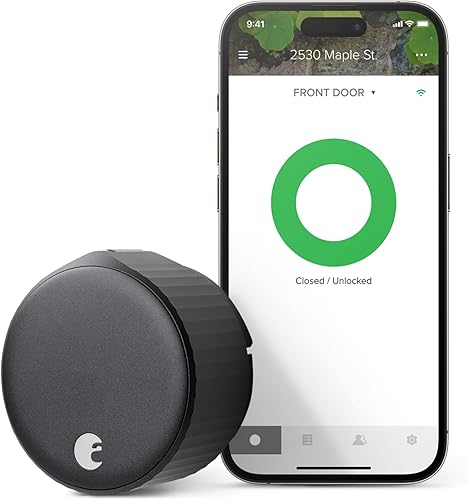
5. August Wi-Fi Smart Lock — Budget retrofit with built-in Wi-Fi
The most affordable smart lock with built-in Wi-Fi and retrofit installation. HomeKit works through a separate bridge, making it the weakest Apple integration on this list — but the price is right.
Why it stands out
The August Wi-Fi Smart Lock is the most affordable entry point on this list at $150-$180. It is a retrofit lock that replaces only the interior thumb turn, keeping your existing exterior deadbolt hardware and physical keys. Installation takes about 10 minutes. Built-in Wi-Fi means you get remote access through the August app without buying a separate hub, and it works with Alexa and Google Home natively.
HomeKit compatibility comes with an important asterisk. The August Wi-Fi Smart Lock does not natively support HomeKit — you need the August Connect Wi-Fi Bridge (sold separately, about $50-$80) to add HomeKit functionality. Once the bridge is set up, the lock appears in the Home app and responds to Siri commands. However, the bridge adds another potential failure point and introduces slight latency compared to locks with native HomeKit support. HomeKit automations work through the bridge, but the experience is noticeably less responsive than the Schlage Encode Plus or Aqara U100.
Where the August excels is the August app itself. It is one of the best smart lock apps available, with detailed activity logs, guest access management, auto-lock and auto-unlock features (using phone GPS), and DoorSense — a sensor that detects whether your door is open or closed, not just whether the lock is engaged. DoorSense is genuinely useful and something most competitors lack.
The compact design sits on the interior side of your door and is smaller than previous August lock generations. It does not look particularly elegant, but it is unobtrusive enough. Battery life is decent at 3-6 months on two CR123A batteries, though Wi-Fi connectivity is a constant battery drain that Bluetooth-only operation would avoid.
Key specs
- Connectivity: Wi-Fi, Bluetooth
- Apple Home Key: No
- Security rating: ANSI/BHMA Grade 2 (uses existing deadbolt)
- Keypad: No (optional August Smart Keypad sold separately)
- Power: 2x CR123A batteries
- Installation: Retrofit (interior only)
- Ecosystems: Alexa, Google Home (HomeKit via August Connect Bridge)
Pros
- + Most affordable smart lock on this list at $150–$180
- + Retrofit installation — keeps existing keys and exterior hardware
- + Built-in Wi-Fi for remote access without a hub
- + DoorSense detects if door is open or closed
- + Excellent August app with auto-unlock and guest management
Cons
- - HomeKit requires separate August Connect Bridge ($50–$80 extra)
- - No Apple Home Key
- - No Thread or Matter support
- - Bridge adds latency and a potential failure point for HomeKit
- - Battery life is shorter than Thread-based locks
Who should buy it
Budget-conscious buyers who want a functional smart lock at the lowest price point. Renters who need a retrofit that keeps their existing exterior hardware and keys. Households that primarily use Alexa or Google Home and only need basic HomeKit compatibility. If you are testing the smart lock waters and do not want to spend $250+ on your first lock, the August is a reasonable starting point.
Who should skip it
Serious HomeKit users should look elsewhere. The bridge requirement, lack of Home Key, absence of Thread, and no Matter support make this the weakest HomeKit lock on the list by a significant margin. If HomeKit is your primary ecosystem, the Aqara U100 at $190 is a far better investment — you get native HomeKit, Home Key, Thread, and Matter for only $10-$40 more than the August plus its bridge. The August makes sense as a budget Alexa or Google Home lock that happens to work with HomeKit, not as a HomeKit-first lock.
August Wi-Fi Smart Lock
What to consider when choosing a HomeKit smart lock
Apple Home Key: the headline feature
Home Key is the single biggest differentiator between HomeKit locks. Locks that support it — the Schlage Encode Plus, Aqara U100, and Level Lock+ — offer a tap-to-unlock experience that is faster and more convenient than any other method. You hold your iPhone or Apple Watch near the lock and it unlocks, just like Apple Pay. Home Key credentials are stored in the Secure Element, not in an app, so they work in power reserve mode when your battery is critically low. If you carry an iPhone and Apple Watch daily, Home Key should be a top priority.
Thread vs. Wi-Fi vs. Bluetooth for HomeKit
Thread is the best connectivity option for HomeKit smart locks. It offers low latency, low power consumption, and mesh networking through your HomePod Mini or Apple TV 4K. Thread locks like the Aqara U100 and Level Lock+ respond faster and drain batteries slower than Wi-Fi locks. Wi-Fi locks like the Schlage Encode Plus and August offer remote access without a home hub but consume more battery power. Bluetooth-only locks work but are the slowest and shortest-range option. If you have a HomePod Mini, prioritize Thread.
Retrofit vs. full replacement
Retrofit locks (Level Lock+, August) keep your existing exterior hardware and physical keys. You only replace the interior mechanism. This is essential for renters and great for anyone who wants to preserve their door's appearance. Full replacement locks (Schlage Encode Plus, Aqara U100, Yale Assure Lock 2) replace the entire deadbolt assembly. They offer more integrated features like keypads and typically better security ratings, but require more installation effort and permanently change your door hardware.
The home hub question
Every HomeKit lock benefits from a home hub (HomePod, HomePod Mini, or Apple TV 4K). Without one, you lose remote access, automations, guest sharing, and Thread connectivity. The HomePod Mini at $99 is the most cost-effective choice — it serves as both a Siri speaker, a Thread border router, and a HomeKit home hub. If you are investing $200+ in a HomeKit lock, the $99 HomePod Mini is essentially a required accessory. Budget accordingly.
Common mistakes to avoid
Assuming all HomeKit locks support Home Key
This is the most common misconception. HomeKit compatibility and Apple Home Key are not the same thing. A lock can work with HomeKit — appearing in the Home app, responding to Siri, running automations — without supporting Home Key. Only the Schlage Encode Plus, Aqara U100, and Level Lock+ support Home Key as of early 2026. The Yale Assure Lock 2 and August Wi-Fi Smart Lock are HomeKit-compatible but do not offer Home Key. Always verify Home Key support specifically if tap-to-unlock is important to you.
Buying a smart lock without a home hub
A HomeKit lock without a home hub is severely limited. You can only control it via Bluetooth when standing near the lock. No remote access, no automations, no sharing access with family members, and no Thread connectivity. A HomePod Mini ($99) or Apple TV 4K transforms the experience. If your smart lock budget does not include a home hub, either adjust your budget or reconsider whether HomeKit is the right ecosystem for your current setup.
Ignoring battery type and life
Smart lock battery life varies dramatically. Thread-based locks like the Aqara U100 and Level Lock+ are the most efficient, lasting 6-12 months on small batteries. Wi-Fi locks like the Schlage Encode Plus and August drain batteries faster because Wi-Fi radios consume significantly more power — expect 4-8 months for the Schlage and 3-6 months for the August. Also consider battery availability: AA batteries (Schlage, Yale) are cheap and everywhere. CR123A batteries (Aqara, August) and CR2 batteries (Level) are less common and more expensive. Factor ongoing battery costs into your decision.
Choosing based on price without considering total cost
The August Wi-Fi Smart Lock looks like the cheapest option at $150, but adding the August Connect Bridge for HomeKit pushes the total to $200-$230. At that price, the Aqara U100 at $190 is a significantly better HomeKit lock. Similarly, the Yale Assure Lock 2 base price of $200 does not include the radio module — with a Wi-Fi or Matter module, you are looking at $240-$280. Always calculate the total cost including bridges, modules, and a home hub before making your decision.
Get the Smart Home Starter Checklist
Our free checklist covers everything you need to start building a HomeKit smart home — what to buy first, which hubs you need, and how to set up Home Key.
No spam. Unsubscribe anytime.
Related Guides
Frequently asked questions
What is Apple Home Key and which smart locks support it?
Do I need a HomePod or Apple TV to use a HomeKit smart lock?
How does Thread improve smart lock performance in HomeKit?
Can I share HomeKit smart lock access with family and guests?
Will a HomeKit smart lock work if my internet goes down?
Should I choose a retrofit lock or a full lock replacement for HomeKit?
How reliable is Siri for controlling smart locks compared to a keypad or Home Key?
The bottom line
The Schlage Encode Plus is the best HomeKit smart lock in 2026. It is the complete package — Apple Home Key, built-in Wi-Fi for no-hub remote access, ANSI Grade 1 security, and a full keypad with 100 access codes. If you want the best possible experience in the Apple Home app and do not mind paying $300 for it, the Schlage is the lock to buy.
For the best value, the Aqara U100 at under $200 is remarkable. It matches the Schlage on Home Key, adds a fingerprint reader and Thread connectivity, and costs nearly $100 less. The trade-off is no keypad and a lower security rating, but for most households the Aqara delivers 95% of the Schlage experience at 65% of the price.
The Yale Assure Lock 2 is the right choice for mixed-ecosystem households. It lacks Home Key but compensates with the broadest platform support and a modular radio system that future-proofs your investment. The Level Lock+ is for design purists who want Home Key in an invisible package. And the August Wi-Fi Smart Lock is the budget entry point, though its HomeKit experience is the weakest of the five.
No matter which lock you choose, pair it with a HomePod Mini. The $99 investment unlocks remote access, automations, Thread connectivity, and the full potential of any HomeKit smart lock. Without a home hub, you are leaving half the value of your smart lock on the table.